
Custom Integration (WMS/Middleware)
Best for: Large businesses with existing WMS or middleware systems managing multiple fulfillment providers.
Setup
- Existing WMS or middleware system
- Spreetail middleware integration
- Automated order routing and management
How it Works
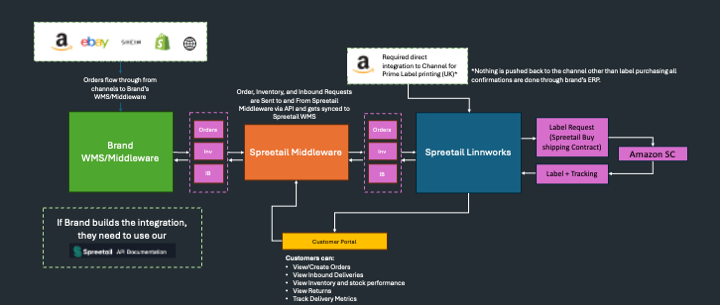
Key Characteristics
- Has WMS/Middleware
- Spreetail is not the only provider
Benefits
- Seamless integration with existing systems
- Automated order routing
- Centralized management of multiple providers
- Data transformation and normalization
- Bidirectional data flow (orders, inventory, POs)
Key Features
- Order Flow: Orders flow from your WMS through our middleware to Spreetail WMS
- Inventory Sync: Real-time inventory updates between systems
- PO Management: Purchase orders and inbound deliveries synchronized
- Order Confirmations: Dispatch confirmations flow back through middleware
- Data Cleaning: Automatic data transformation and validation
Requirements
- Existing WMS or middleware system
- API integration capabilities
- Amazon UK direct access (if Prime fulfillment needed)
- SKU setup in Spreetail tools
- Customer portal access
Technical Details
- Our middleware handles data transformation
- Cleans and normalizes data from your system
- Formats data for Spreetail WMS
- Handles confirmations and status updates
Advantages
- ✅ Live Inventory Sync: Inventory levels are updated directly and in real-time in your customer middleware/WMS
- ✅ Live Order Sync: Orders are synchronized directly and in real-time in your customer middleware/WMS
- ✅ Prime Availability: Prime is available in UK/DE only if Amazon Direct integration is set up into our WMS
- ✅ Scalable Costs: Integration cost per month scales with volume
- ✅ Fast Development: Spreetail can develop the integration, cutting lead time to launch
Limitations
- ⚠️ Prime Availability: No Prime availability in UK if there's no direct integration to Amazon
Use Case
Perfect for established businesses with sophisticated fulfillment operations that need to integrate Spreetail alongside other providers while maintaining centralized control.
Getting Started
- Contact [email protected] to discuss requirements.
- Schedule integration call with your technical team.
- Decide on who will build the integration Spreetail or yourself.
- Provide Amazon UK access (if Prime needed)
- Send SKUs to Account Manager for onboarding
- Set up SKUs in Spreetail Tools portal -> Done by Account Manager
- Configure middleware integration -> Done by Spreetail Technology Department
- Test integration and go live
Should You develop the integration or should we?
We know our WMS inside out and your operation is really important to us. To cut the lead time We are happy to build the integration for you if you provide us with the following:
- Detailed process documentation: End-to-end business workflows for sales orders, purchase orders, inventory management, and returns.
- API documentation and endpoints: Full API specs for your ERP or middleware, including authentication, supported data formats, and request/response examples.
- Test environment access: Sandboxed access to your staging or test ERP system for integration development and testing.
- Sample data: Realistic test data and example payloads for orders, inventory, and confirmations.
- Data mapping requirements: A clear mapping of your data fields to Spreetail’s standard data structure (SKU, quantities, statuses, addresses, etc.).
- Technical point of contact: A dedicated engineer or team member to answer clarifying questions during development.
- Integration lead time: Your required go-live timeline or key project milestones.
- Security requirements: Any additional security requirements or protocols relevant to your ERP environment.
- Notification preferences: How you wish to receive updates, errors, or confirmations from Spreetail (e.g., webhooks, email, API callbacks).
- Ongoing support contacts: Who will manage integration support/escalations on your side after launch.
Related Documentation
- Integration Types Overview - Compare all integration types
- Getting Started Guide - Begin your integration journey
- Authentication Guide - Learn about API authentication
- API Overview - High-level API architecture
Questions? Contact [email protected] for assistance with Custom Integration setup.
Updated 9 months ago
Did this page help you?