
Linnworks to Linnworks Integration
Best for: Businesses using Linnworks as their WMS who want seamless integration with Spreetail's Linnworks-based system.
Setup
- Your WMS: Linnworks
- Spreetail WMS: Linnworks
- Direct system-to-system integration
How it Works
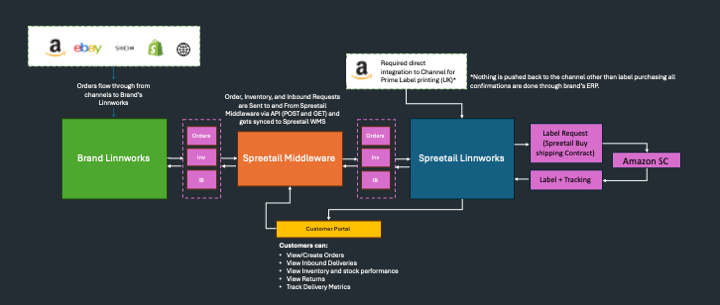
Key Characteristics
- WMS is Linnworks
- Spreetail is not the only provider
Benefits
- Native system compatibility
- Familiar interface and workflows
- Streamlined data exchange
- Similar to Custom Integration but with system alignment
Key Features
- Same WMS platform on both sides
- Simplified integration due to system familiarity
- Standard Linnworks workflows
- Efficient data synchronization
Requirements
- Contact [email protected] to discuss requirements.
- Provide us with developer access to your portal (Application ID, Secret, and Refresh Token).
- Setup a warehouse in Linnworks called Spreetail and provide us with Location ID.
- Provide Amazon UK access (if Prime needed)
- Send SKUs to Account Manager for onboarding
- Set up SKUs in Spreetail Tools portal -> Done by Account Manager
- Configure middleware integration -> Done by Spreetail Technology Department
- Test integration and go live
Advantages
- ✅ Live Inventory Sync: Inventory levels are updated directly and in real-time in your customer middleware/WMS
- ✅ Live Order Sync: Orders are synchronized directly and in real-time in your customer middleware/WMS
- ✅ Prime Availability: Prime is available in UK/DE only if Amazon Direct Integration is set up into our WMS
- ✅ Scalable Costs: Integration cost per month scales with volume
- ✅ Fast Development: Spreetail already has the mapping setup for the integration so it will be a speedy process.
Limitations
- ⚠️ Prime Availability: No Prime availability if there's no shipping integration to Amazon
Use Case
Ideal for businesses already using Linnworks who want to leverage the native compatibility for smoother integration with Spreetail's fulfillment services.
Getting Started
- Contact [email protected] to discuss requirements
- Schedule integration call with technical team
- Provide Amazon UK access (if Prime needed)
- Set up SKUs in Spreetail tools
- Configure Linnworks integration
- Test and launch
Related Documentation
- Integration Types Overview - Compare all integration types
- Getting Started Guide - Begin your integration journey
- Authentication Guide - Learn about API authentication
- API Overview - High-level API architecture
Questions? Contact [email protected] for assistance with Linnworks to Linnworks integration setup.
Updated 9 months ago
Did this page help you?